


No products in the cart.

Website Security Incident Report
Malware Analysis and Security Hardening Guide
| Website | rangura.rw |
| Platform | WordPress |
| Incident Type | SEO Spam Injection / User-Agent Cloaking / Malicious Redirect |
| Status | Resolved |
| Primary Issue | Malicious redirection and cloaking |
| Document Purpose | Incident documentation, forensic record, remediation procedure, and future security best practices |
1. Executive Summary
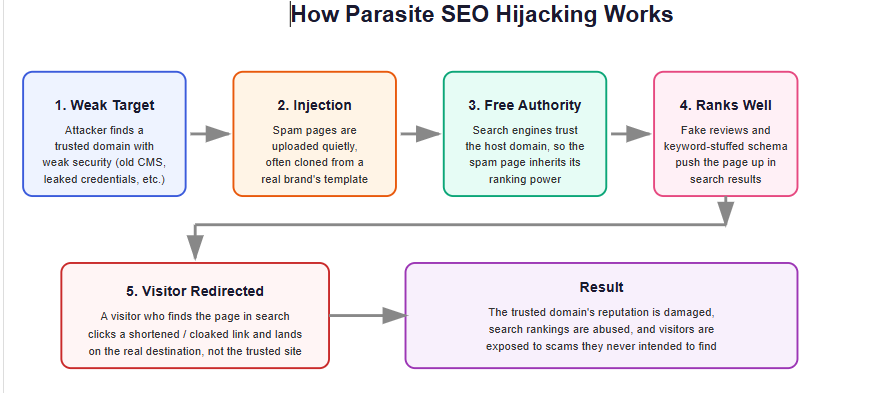
The website rangura.rw experienced a security compromise in which malicious code was introduced into the WordPress installation. The attack involved user-agent-based cloaking, where different content was presented depending on the type of visitor accessing the website.
The malicious configuration was designed to:
- Detect search engine crawlers such as Googlebot.
- Detect mobile visitors.
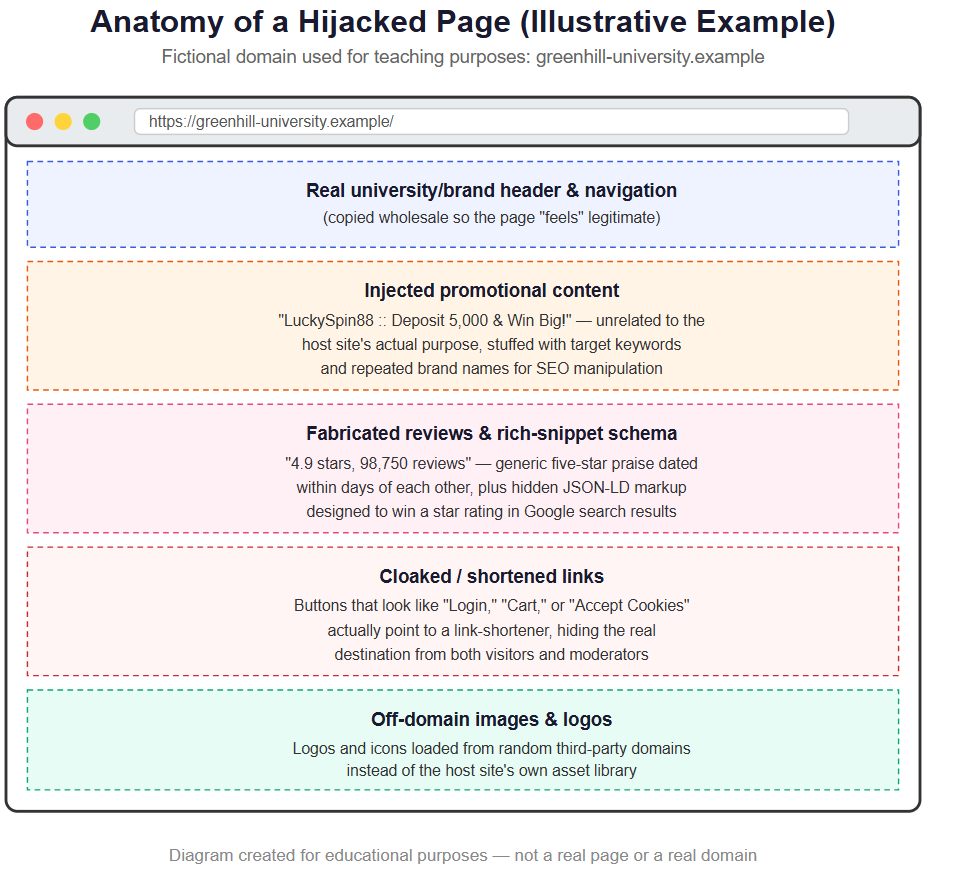
- Serve malicious SEO and gambling-related content to selected visitors.
- Redirect or expose users to external websites.
- Attempt to manipulate search engine indexing.
- Promote unauthorized gambling-related content.
- Use the legitimate website domain to improve the visibility of malicious SEO content.
The malicious content included references to:
OLXSLOTSlot GacorSLOTSPORTCASINOPRAGMATICSABA SPORTEVOLUTION
The injected content also contained external links to:
https://lxgoods.vip/olxslot
The website was restored after identifying that the redirection/cloaking mechanism was the primary issue. The incident demonstrates the importance of continuous WordPress security monitoring, file integrity checking, access control, malware scanning, and regular backups.
How the Incident Started and How It Was Mitigated
The compromise almost certainly began at the file-access level rather than through WordPress’s normal admin interface. The presence of a modified root index.php and an unfamiliar file, kodok.php, sitting alongside it indicates the attacker had gained the ability to write and execute arbitrary PHP files on the server. In cases like this, the entry point is typically one of a small set of causes: an outdated or vulnerable plugin/theme with a known file-upload or remote-code-execution flaw, reused or leaked WordPress/cPanel/FTP credentials, or a weak password on an administrator account. Because the original point of entry is rarely preserved once an attacker starts cleaning up after themselves, the exact vector for this incident should still be confirmed through a log review, but the modification pattern is consistent with direct file system access rather than a WordPress content edit.
Once in place, the cloaking script was effective specifically because it was selective. It inspected the visitor’s HTTP User-Agent header and only served the gambling-related SEO page (via text.txt) to recognized search engine crawlers and mobile browsers, while routing ordinary desktop visitors through kodok.php to the real, unmodified WordPress site. This meant that anyone checking the website casually from a desktop browser — including, most likely, the site’s own administrators — would see nothing unusual. Cloaking exists precisely to defeat that kind of casual inspection, which is why compromises like this one are able to run for extended periods, quietly accumulating search engine indexing and reputational damage, before anyone notices.
Discovery typically follows one of a few paths: an administrator or user searching the site’s own domain and noticing gambling-related terms in the results, a Google Search Console security or manual-action alert, or a third party flagging unusual search snippets tied to the domain. Once the unexpected content was noticed, the investigation moved to the file system rather than the WordPress dashboard, since dashboard content and pages appeared normal. That inspection surfaced the altered index.php, the presence of text.txt containing the gambling advertisement content, and the outbound link to https://lxgoods.vip/olxslot embedded in that file — at which point the cloaking logic reproduced in Section 4 was extracted and confirmed as the mechanism responsible.
Mitigation began with evidence preservation rather than immediate deletion: copies of index.php, text.txt, and kodok.php were retained along with their modification timestamps before any cleanup took place, and the site was temporarily restricted while the investigation was completed. The malicious index.php was then replaced with a clean copy matching the standard WordPress core file for the installed version, text.txt was removed entirely, and kodok.php — confirmed to be a functionally normal WordPress bootstrap file rather than an independent payload — was removed once it was no longer referenced by anything else. All administrator, hosting, FTP/SFTP, and database credentials were reset as a precaution, since the initial access vector could not be ruled out as credential-based.
Longer-term mitigation focused on closing the gap that allowed file-level access in the first place rather than treating the cleanup as the end of the response. WordPress core, all plugins, and the active theme were brought fully up to date, unused plugins and themes were removed, two-factor authentication was enabled for administrator accounts, and file editing from within the WordPress dashboard was disabled via DISALLOW_FILE_EDIT. A recurring schedule of malware scanning, file-integrity monitoring on critical files such as index.php and .htaccess, and offsite backups was put in place going forward, and once the site was confirmed clean, the indexed spam URLs were flagged for removal through Google Search Console so search results could recover alongside the technical fix.
2. Incident Overview
2.1 Affected Website
rangura.rw
2.2 Technology
WordPress
PHP
Apache/.htaccess
MySQL/MariaDB
2.3 Type of Attack
The incident exhibited characteristics of:
- SEO poisoning
- Search engine cloaking
- User-agent detection
- Malicious redirect
- Unauthorized HTML injection
- Spam content injection
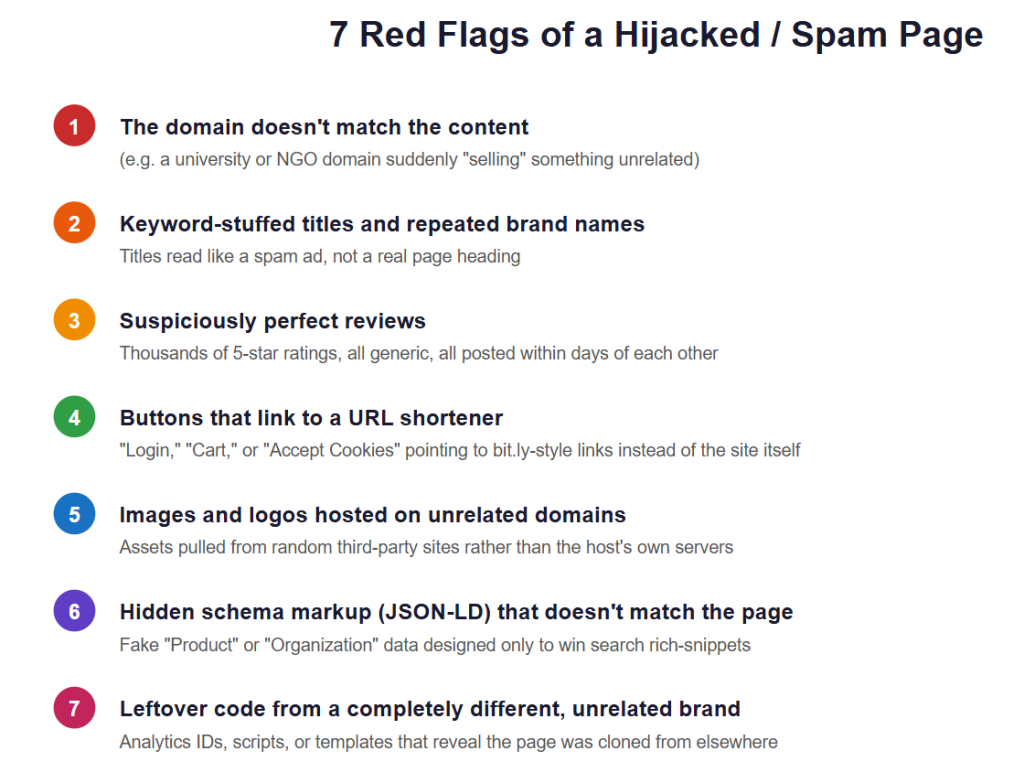
3. How the Attack Worked
The attack relied on modifying the website’s entry point. The legitimate WordPress index.php was replaced or modified with code that checked the visitor’s browser user-agent. This technique is commonly known as cloaking, and it allowed the attacker to hide the compromise from normal visitors while presenting spam content to search engines and mobile users.
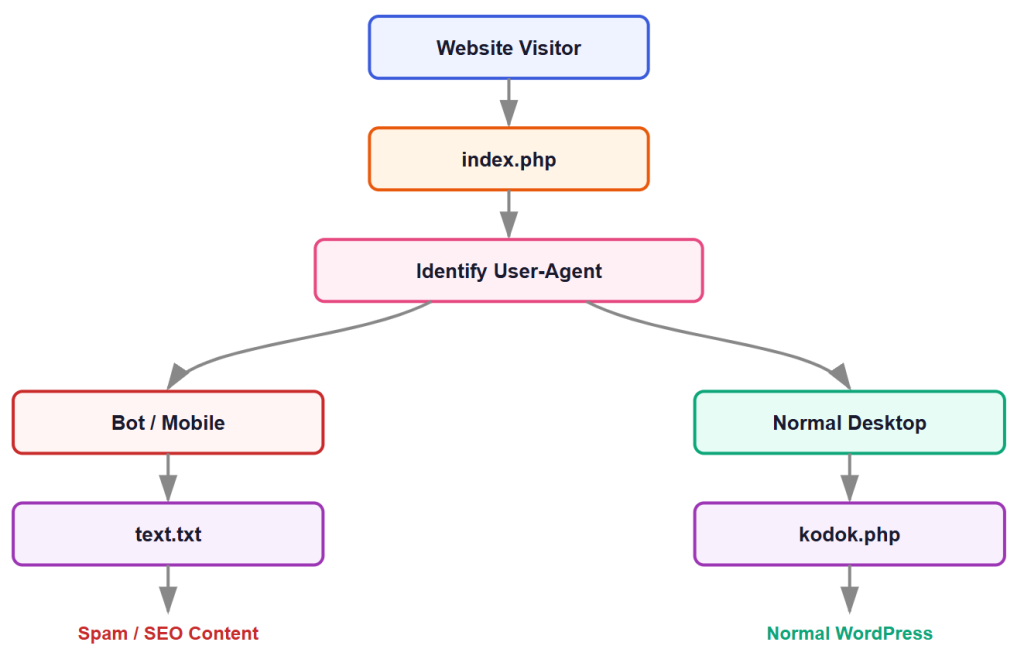
Figure 1: Cloaking logic in the compromised index.php
4. Malicious Code Identified
The modified index.php contained code similar to the following:
<?php

$bot_user_agents = array(
    "Googlebot",
    "Googlebot-Image",
    "Googlebot-News",
    "Googlebot-Video",
    "Storebot-Google",
    "Google-InspectionTool",
    "GoogleOther",
    "GoogleOther-Image",
    "GoogleOther-Video",
    "Google-CloudVertexBot",
    "Google-Extended",
    "APIs-Google",
    "AdsBot-Google-Mobile",
    "AdsBot-Google",
    "Mediapartners-Google",
    "FeedFetcher-Google",
    "Google-Favicon",
    "Google Favicon",
    "Googlebot-Favicon",
    "Google-Site-Verification",
    "Google-Read-Aloud",
    "GoogleProducer",
    "Google Web Preview",
    "Bingbot",
    "Slurp",
    "DuckDuckBot",
    "Baiduspider",
    "YandexBot",
    "Sogou",
    "Exabot",
    "facebookexternalhit",
    "ia_archiver",
    "Alexa Crawler",
    "AhrefsBot",
    "Semrushbot"
);

$user_agent = isset($_SERVER['HTTP_USER_AGENT'])
    ? $_SERVER['HTTP_USER_AGENT']
    : '';

function is_bot($user_agent, $bot_user_agents) {
    foreach ($bot_user_agents as $bot) {
        if (stripos($user_agent, $bot) !== false) {
            return true;
        }
    }
    return false;
}

function is_mobile($user_agent) {
    $mobile_agents = array(
        'Mobile', 'Android', 'Silk/', 'Kindle', 'BlackBerry',
        'Opera Mini', 'Opera Mobi', 'iPhone', 'iPad'
    );
    foreach ($mobile_agents as $mobile) {
        if (stripos($user_agent, $mobile) !== false) {
            return true;
        }
    }
    return false;
}

if (is_bot($user_agent, $bot_user_agents)) {
    include 'text.txt';
    exit;
} elseif (is_mobile($user_agent)) {
    include 'text.txt';
    exit;
} else {
    include 'kodok.php';
    exit;
}
5. Analysis of the Malicious Code
The malicious code performed three main actions.
5.1 Bot Detection
The code checked whether the visitor was a known search engine crawler:
if (is_bot($user_agent, $bot_user_agents))
It specifically searched for user-agents such as Googlebot, Bingbot, DuckDuckBot, Baiduspider, YandexBot, AhrefsBot, and Semrushbot. This indicates that the attacker was specifically interested in search engine indexing and SEO manipulation.
5.2 Mobile Device Detection
The code also checked for mobile devices:
elseif (is_mobile($user_agent))
This included Android, iPhone, iPad, BlackBerry, Kindle, Opera Mini, and Opera Mobi. This means mobile visitors could receive different content from desktop users.
5.3 Malicious Content Injection
The code then loaded include 'text.txt'; for bots and mobile users. Normal desktop visitors were directed to include 'kodok.php';. The kodok.php file contained legitimate WordPress bootstrap code:
<?php

define( 'WP_USE_THEMES', true );

require __DIR__ . '/wp-blog-header.php';
Therefore, the kodok.php file itself was not the main malicious payload. It was effectively being used as an alternative entry point to the normal WordPress website. The actual malicious content was located in text.txt.
6. Malicious SEO Content
The malicious content contained gambling-related material. Example:
<div class="cta">

  <a class="btn"
     href="https://lxgoods.vip/olxslot"
     target="_blank">
     DAFTAR AKUN SLOT GACOR
  </a>

  <a class="btn"
     href="https://lxgoods.vip/olxslot"
     target="_blank">
     LOGIN AKUN SLOT GACOR
  </a>

</div>
Other injected content included: SLOT, SPORT, CASINO, PRAGMATIC, SABA SPORT, EVOLUTION.
The attack also included SEO anchor text similar to:
WEBSITE SLOT GACOR PALING GAMPANG MENANG HARI INI
This is evidence of an SEO spam campaign. The attacker was attempting to use the reputation and domain authority of the legitimate website to promote unrelated gambling content.
7. Sitemap Investigation
The website sitemap was also reviewed. The sitemap contained:
https://bbc.com/
https://bbccom/captcha/
No obvious gambling URLs were identified in the provided sitemap content. However, because the website had already been compromised, the sitemap should still be reviewed regularly for: unknown URLs, gambling pages, spam pages, fake login pages, pharmaceutical spam, adult content, automatically generated directories, and unexpected subdomains.
A clean sitemap does not necessarily mean that the website is clean.
8. Root Cause Investigation
The exact initial entry point should be investigated separately. Possible causes include:
- Compromised WordPress administrator credentials
- Vulnerable WordPress plugin
- Vulnerable WordPress theme
- Outdated WordPress core
- Stolen cPanel credentials
- Compromised FTP/SFTP credentials
- Weak passwords
- Unauthorized administrator account
- Malware already present on the hosting account
- Vulnerable third-party software
- File upload vulnerability
The malicious modification to index.php indicates that the attacker obtained sufficient access to modify website files.
9. Immediate Incident Response Procedure
When a similar incident is detected, the following procedure should be followed.
Step 1: Preserve Evidence
Before deleting suspicious files: create a complete backup, download a copy of suspicious files, record file modification dates, record suspicious URLs, record the IP addresses from server logs where available, and save screenshots of the malicious content. Do not immediately destroy evidence.
Step 2: Put the Website in Maintenance Mode
If the website is actively serving malicious content, temporarily restrict public access while investigation is performed.
Step 3: Identify Modified Files
Review recently modified files. Priority locations:
public_html/
wp-admin/
wp-includes/
wp-content/
wp-content/plugins/
wp-content/themes/
wp-content/uploads/
Pay special attention to PHP files inside wp-content/uploads/. PHP files in the uploads directory are often suspicious unless specifically required.
Step 4: Inspect .htaccess
Check for unauthorized rules involving: RewriteCond, RewriteRule, HTTP_USER_AGENT, Googlebot, Bingbot, mobile, bot, redirect. Look for suspicious redirects.
Step 5: Restore Core WordPress Files
Replace modified WordPress core files with clean copies from the official WordPress distribution matching the installed version. Do not blindly overwrite wp-config.php, because it contains database configuration.
Step 6: Remove Malicious Files
After preserving evidence, remove confirmed malicious files. Examples from this incident included text.txt and the modified index.php. The index.php file was restored to legitimate WordPress code.
10. Restore the Correct WordPress index.php
A standard WordPress root index.php is approximately:
<?php

/**
 * Front to the WordPress application.
 *
 * @package WordPress
 */

define( 'WP_USE_THEMES', true );

require __DIR__ . '/wp-blog-header.php';
The WordPress root index.php should not normally contain custom user-agent detection logic for Googlebot or mobile visitors.
11. Search for Additional Backdoors
After cleaning the website, perform a full search for suspicious code. Search for:
base64_decode
eval(
gzinflate
str_rot13
shell_exec
system(
passthru
assert(
preg_replace
create_function
file_get_contents
curl_exec
HTTP_USER_AGENT
Googlebot
Bingbot
DuckDuckBot
Also search for known malicious indicators identified during this incident:
OLXSLOT
Slot Gacor
lxgoods.vip
text.txt
asipena.tolz.workers.dev
Be careful: not every occurrence of functions such as base64_decode() is malicious. These must be investigated in context.
12. WordPress Administrator Security
Review Users → All Users. Look for unknown administrators, newly created accounts, suspicious usernames, and accounts with administrator privileges that should not have them. Remove unauthorized accounts. Reset passwords for all legitimate administrators.
13. Plugin and Theme Security
Review every installed plugin. Remove unused plugins, abandoned plugins, pirated plugins, nulled themes, and unused themes. Update WordPress Core, plugins, themes, and PHP. Only download plugins and themes from trusted sources.
14. Hosting and cPanel Security
Review cPanel users, FTP accounts, SFTP accounts, SSH access, cron jobs, email accounts, database users, File Manager access, API tokens, and hosting control panel sessions. Remove unknown accounts. Change all credentials following an incident.
15. Password Policy
Use strong, unique passwords for cPanel, WordPress, database, FTP/SFTP, hosting provider, and domain registrar. Never reuse the same password between services. Enable multi-factor authentication where available.
16. File Permission Best Practices
Typical WordPress permissions are:
Directories: 755
Files:       644
wp-config.php: More restrictive where supported
Avoid 777 unless there is a specific technical requirement. File permissions should be reviewed after a compromise.
17. Disable PHP Execution in Uploads
Where appropriate, prevent PHP execution in wp-content/uploads/. This can reduce the risk of attackers uploading and executing malicious PHP files. The exact configuration should be tested carefully before implementation.
18. WordPress Security Hardening
Recommended controls include:
- Keep WordPress updated.
- Keep plugins updated.
- Keep themes updated.
- Remove unused plugins.
- Remove unused themes.
- Use strong administrator passwords.
- Enable 2FA.
- Limit administrator accounts.
- Disable unnecessary file editing.
- Use HTTPS.
- Use a Web Application Firewall.
- Monitor login attempts.
- Monitor file changes.
- Regularly scan for malware.
- Maintain offline backups.
- Review server logs.
19. Disable WordPress File Editing
If administrators do not need to edit plugin and theme files from WordPress, consider disabling the built-in editor. In wp-config.php:
define( 'DISALLOW_FILE_EDIT', true );
This reduces the ability to modify PHP files directly from the WordPress dashboard if an administrator account is compromised.
20. Backup Strategy
Maintain multiple backups. Recommended approach:
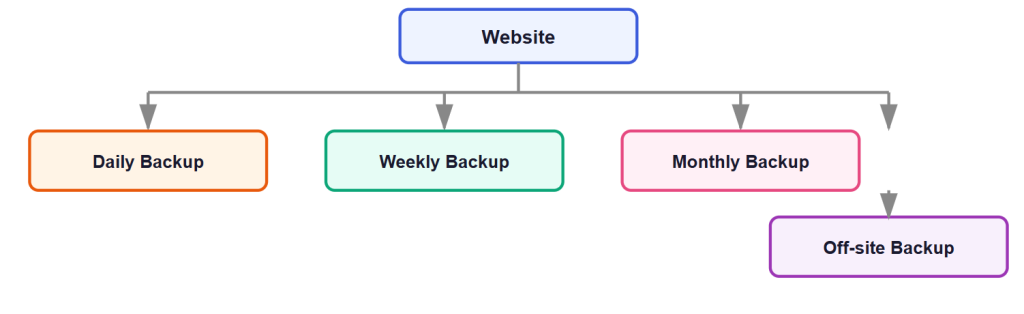
Figure 2: Recommended backup rotation
Backups should include WordPress files, database, configuration, and media/uploads. At least one backup copy should be stored separately from the hosting server. Most importantly, regularly test restoration. A backup that cannot be restored is not a reliable backup.
21. Monitoring and Detection
Implement monitoring for:
File changes
Monitor index.php, .htaccess, wp-config.php, and other critical files.
Administrator changes
Monitor new users, role changes, and password resets.
Plugin changes
Monitor plugin installation, plugin activation, and plugin updates.
Website behavior
Monitor for unexpected redirects, Google Search Console warnings, spam URLs, unusual traffic, unexpected 404 pages, and new PHP files.
22. Google Search Console Monitoring
After an SEO spam incident, check Google Search Console for security issues, manual actions, indexed spam URLs, unusual search queries, unexpected pages, and coverage/indexing changes.
Search Google using:
site:rangura.rw
Look for pages that do not belong to the organization. Examples:
site:rangura.rw slot
site:rangura.rw casino
site:rangura.rw gacor
If malicious pages have been indexed, clean the website first and then request re-indexing/removal through the appropriate Google tools.
23. Security Testing After Cleanup
After cleanup, test the website using a desktop browser (confirm the homepage loads normally), a mobile device (confirm the homepage loads normally), and a search engine crawler simulation (verify that the website does not serve a different malicious page based on user-agent). Check HTTP status codes (200 OK where appropriate) and verify that the website does not unexpectedly redirect to external domains.
24. Incident Indicators Identified
The following indicators should be retained in the incident report:
OLXSLOT
Slot Gacor
DAFTAR AKUN SLOT GACOR
LOGIN AKUN SLOT GACOR
PRAGMATIC
SABA SPORT
EVOLUTION
lxgoods.vip/olxslot
Suspicious file: text.txt. Modified entry point: index.php. Alternative WordPress bootstrap file: kodok.php.
The kodok.php code itself was found to be functionally equivalent to the standard WordPress entry point and was not independently identified as the malicious payload.
25. Lessons Learned
Lesson 1: A website can appear normal to administrators while serving malicious content to search engines and mobile users.
Lesson 2: A clean homepage does not necessarily mean the website is clean.
Lesson 3: User-agent-based cloaking should be treated as a serious security indicator.
Lesson 4: Unexpected PHP or text files in the website root should be investigated.
Lesson 5: Search engine indexing must be monitored after a compromise.
Lesson 6: Backups must be maintained separately from the production server.
Lesson 7: Security monitoring should detect unauthorized file modifications.
26. Recommended Security Architecture
For a production WordPress website, the recommended security model is:
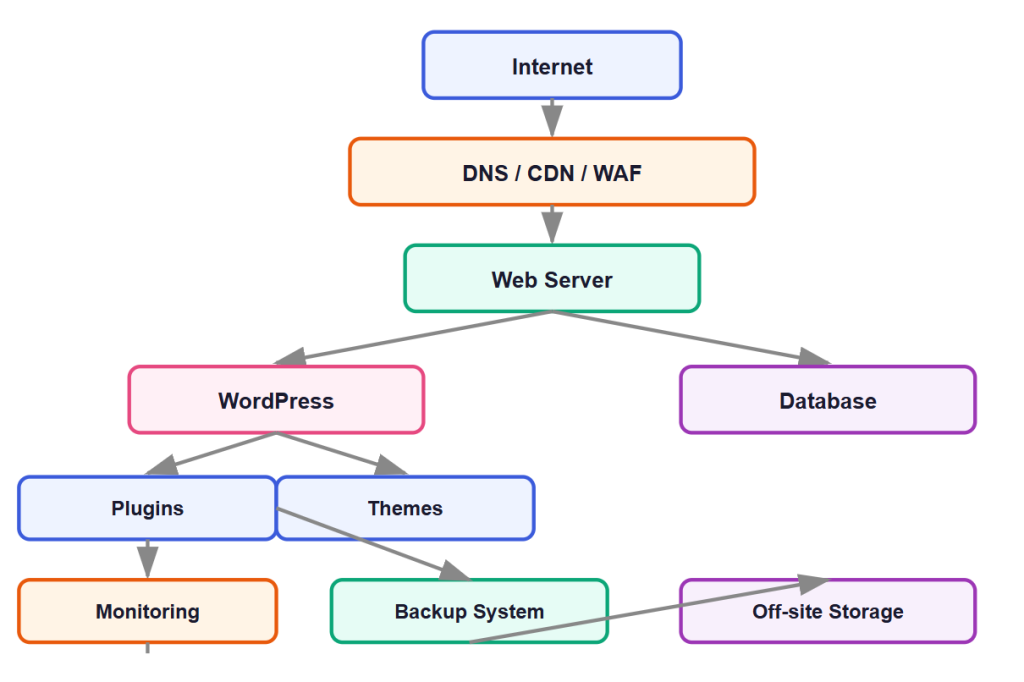
Figure 3: Recommended security architecture — no single compromised component should cause permanent loss of the website
27. Final Incident Status
| Status | Resolved |
| Primary malicious behavior | User-agent-based cloaking and SEO spam injection |
| Affected component | WordPress website entry point and malicious content file |
| Malicious content | Gambling-related SEO spam |
| Resolution | Malicious redirection/cloaking mechanism identified and removed/restored |
| Current status | Website functioning normally after removal of the malicious redirection |
Recommended Next Step
Perform a complete post-incident malware scan and review all recently modified files, administrator accounts, plugins, themes, .htaccess, cron jobs, and hosting access logs to ensure no persistent backdoor remains.
Security Incident Conclusion
The incident involving rangura.rw demonstrates a sophisticated but recognizable form of WordPress compromise involving SEO spam and user-agent cloaking. The attacker modified the website’s entry point to differentiate between search engine crawlers, mobile users, and normal desktop visitors. The malicious code then served an external gambling-related SEO page through text.txt, while normal desktop users were directed to a WordPress bootstrap file.
The most important security improvement is to move from a reactive approach, where malicious files are removed after discovery, to a continuous security approach involving:
Prevention → Monitoring → Detection → Backup → Incident Response → Recovery → Continuous Hardening
The website should now undergo a full security audit to confirm that the attacker did not leave any additional backdoors or compromised administrator credentials.